
Addons
NOTE - Developers are constantly making updates to their addons! This page will continuously be updated until Midnights full launch. I will add a changelog at the bottom of this page with the last time I've updated any codes and which ones.
Step 1 - Delete all out-of-date or incompatible addons!
You can check in-game which addons are no longer compatible by opening the game menu and clicking "Addons."
The far right will display if the addon is "incompatible."
Step 2 - Uninstall those addons via Curseforge or your Game Folder
C:\Program Files (x86)\World of Warcraft\_retail_\Interface\AddOns
Step 3 - Download addons via Curseforge
Links are included here
Step 4 - Go Ingame and import profile codes in appropriate areas
Edit Mode

The default Edit-Mode in-game. This is to setup your UI just like mine! Open your game menu and select "Edit Mode." Go to your layout drop-down and select "Import." A new window opens, take the code below - copy and paste it into that box, give it a name and hit "Import."
Arc UI

A complete overhaul to your Cooldown Manager! The closest thing to WeakAuras that we have. Edit your Blizzard Cooldown Manager (choose your buffs/abilities/CDs you want to track and hide) and then import my profile for a nice clean layout. You can freely organize your icons while in ArcUI. Note - I do not use bars!
Open ArcUI -> Profile Manager -> External Export/Import -> copy/paste code in "Import Settings" & "Accept" -> Expand "Import Options" -> Only check "Group Layouts" "Global Default" "Group Settings" -> Import Settings -> Reload your UI with /reload
Sensei Class Resource Bar
This is an easy way to constantly see your HP and resources (runic power, runes, mana, energy, rage, holy power, soul shards....etc.) This eliminates the need of keeping a unit frame for yourself and frees up some UI landscape. Bars can be freely sized and moved around.
Edit Mode -> select the Sensei Bars -> Import This Bar -> copy/paste codes -> Okay
Unhalted Unit Frames

This replaces the default Blizz frames - User, Enemy, Enemies Target, Focus. This does not handle party or raid frames. Very clean and simplified. Customize where buffs/debuffs appear and can make your own buffs/debuffs bigger. Does not individually hide buffs/debuffs that's still restricted by the API.
Type /uuf -> Profiles -> copy/paste code in "Importing" -> Import Profile -> Give name press "Import"
Danders Party/Raid Frames
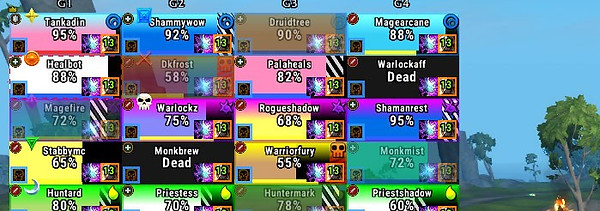
This replaces the default Blizz frames - Party and Raid. Customize where buffs/debuffs appear and can make your own buffs/debuffs bigger. Does not individually hide buffs/debuffs that's still restricted by the API. Also adds timer colors for when buffs/debuffs are about to expire - Green to yellow to red. Also notifies who is being targeted by important spells with easy to see graphics, plus if that ability was interrupted.
Open Danders -> Scroll down to "Profiles" -> Import/Export -> copy/paste code in "Import" -> Parse String -> Name it and select what options you want (all) -> Import Selected
Platynator (Nameplates)

I was a Plater enjoyer but have switched to Platy due to the new API restrictions. Plater had a bunch of customization but the menus are very bloated now that most of the API is restricted. Regardless I wanted something new and went with Platy. Super clean, super simplified, and super easy to customize. Also colors mobs according to type - caster, melee, mini-boss, boss.
Type /platy -> Import -> copy/paste the code (style is my current platy settings - Profile includes every style I have used or changed) -> Name it and hit "Okay"
BigWigs (Boss Alerts)
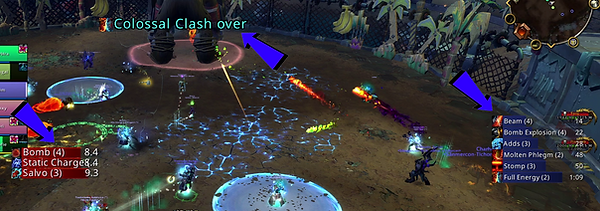
Still enjoying BigWigs as I'm not a fan of the timeline look. Still using bars and have them nice clean and organized. Onlyl suggestion if using my code is maybe reduce the size a little more, but since I raid lead regularly I like them to be a little bigger. Still doesn't take up much UI real-estate.
Open BigWigs -> Profiles -> Import -> copy/paste code and select all settings -> Import -> Accept
LittleWigs (Boss Alerts)
LittleWigs is specifically for dungeons! Does the same as BigWigs but is needed for dungeons. Covers new dungeons and Mythic+ dungeon rotations. There are additional modules if you want to have alerts for older content - Cataclysm, Legion etc.
No additional code is required as this operates with BigWigs information.
Details (Damage Meter)

I really wanted to use the default Blizz damage meters because I think they look aesthetically pleasing! However, you are unable to move the primary window without going into edit mode and that's a massive turn-off for me. Details remains my go to and they have implemented a new all-in-one window which shows everything! Big fan.


